
You send your pitch deck to five people you trust. By Friday you have ten notes. One investor can’t tell what you charge. Another asks how many customers are paying. Your advisor says it’s too long. A friend wants a competitor matrix and more charts. Your co-founder wants a bigger logo, and someone suggests trying blue.
So you open the file and work down the list. A week later the deck is seven slides longer, the pricing slide has a table nobody asked to read, and the next reader is more confused than the last one.
Feedback is useful. Treating every note as an instruction isn’t. This guide is for founders, sales leaders and anyone else who has to turn a pile of comments into a better deck. It covers why following every note backfires, a four-step way to sort what you’ve heard, and how to check that a change really worked.
Why following every note makes a deck worse
Each note is reasonable on its own. The trouble starts when you add them together.
- Notes pull in opposite directions. “Make it shorter” and “more charts” can’t both win. Try to satisfy both and the deck does neither.
- The last reader wins. Whoever spoke most recently tends to feel the most urgent, so each round quietly undoes the one before.
- Nobody owns the story. A deck makes a point in a particular order. Once every reader is steering, it starts answering their questions one at a time and stops making your case.
There’s a quieter problem too. Readers are usually good at noticing that something isn’t working, and much less reliable at saying why. Someone who writes “add more detail here” has told you something true: they got stuck on this slide. The suggested fix is only their first guess.
What a note is really telling you
Treat a note as a symptom, not a prescription. It shows you where the deck hurt. Working out what caused that, and how to fix it, is still your job.

“Pricing felt vague” doesn’t mean the slide needs more pricing. It means the reader can’t say who pays or how much. “Make it shorter” rarely means the deck has too many pages. More often the reader lost the thread somewhere in the middle. “How many are paying?” means the slide shows interest, and the reader was looking for customers.
This also changes what you ask in the first place. “What do you think?” invites opinions on logos and colors. A better question is “Where did you slow down or stop believing it?” It points readers at the job of the deck instead of its decoration. You can also ask them to tell you, in one sentence, what the company does. If they can’t, that’s more important than anything on their list.
It’s the same idea behind giving a deck an argument before giving it more design: the problem is usually in the thinking, and the slide is just where it shows.
A worked example: ten notes on one seed deck
We’ll use one example from here on. A founder is raising a seed round for ordering software aimed at independent florists. The deck has 12 slides. Five people read it: two investors, an advisor, a friend and the co-founder. Between them they leave these ten notes:
- Investor A: “What do you actually charge?” and “Is this real demand?”
- Investor B: “I couldn’t tell who pays.” and “How many are paying?”
- Advisor: “Pricing felt vague.” and “Make it shorter.”
- Friend: “Add a competitor matrix.”, “Try blue instead of green.” and “More charts.”
- Co-founder: “Can the logo be bigger?”
Move 1: Put every note on one page and count what repeats
Don’t leave notes scattered across email threads, slide comments and your memory. Put them all in one place, in the reader’s own words, with the slide number and the reader’s name beside each one. A simple spreadsheet is plenty.
Then group them by where they landed and count. In the florist deck, the result is plain: pricing has three notes, traction has two, and five other topics have one each.

Three people stopping on the same slide is a signal, even when they used different words. “What do you actually charge?”, “I couldn’t tell who pays” and “Pricing felt vague” look like three notes. They’re one problem. A single note on its own might be useful and it might be taste. Keep it, but don’t act on it yet.
Move 2: Sort the notes into three piles
Next, decide what kind of note each one is. Almost every comment on a deck falls into one of three piles, and each pile needs a different response.
Confused: fix the slide
The reader didn’t understand something. This is the pile you can fix fastest, because it’s mostly a question of wording, order and emphasis. In the example, the three pricing notes and “Make it shorter” belong here.
Doubtful: bring better proof
The reader understood the claim and doesn’t believe it yet. “Is this real demand?” and “How many are paying?” are doubts. No amount of design fixes doubt. The answer is evidence: show the paying number on the slide, or go and earn one. Our guide to the traction slide covers how to show momentum when the numbers are still small.
Taste: decide once and move on
The reader would simply do it differently. Logo size, blue versus green and “more charts” are preferences. Taste notes aren’t worthless, but they shouldn’t reopen a decision every time someone new has an opinion. Make the call once, write it down and leave it alone.

In the florist deck, that gives four confused notes, two doubtful notes and four taste notes, and it already shows how little of the original list needs real work.
Move 3: Weigh each note by who said it
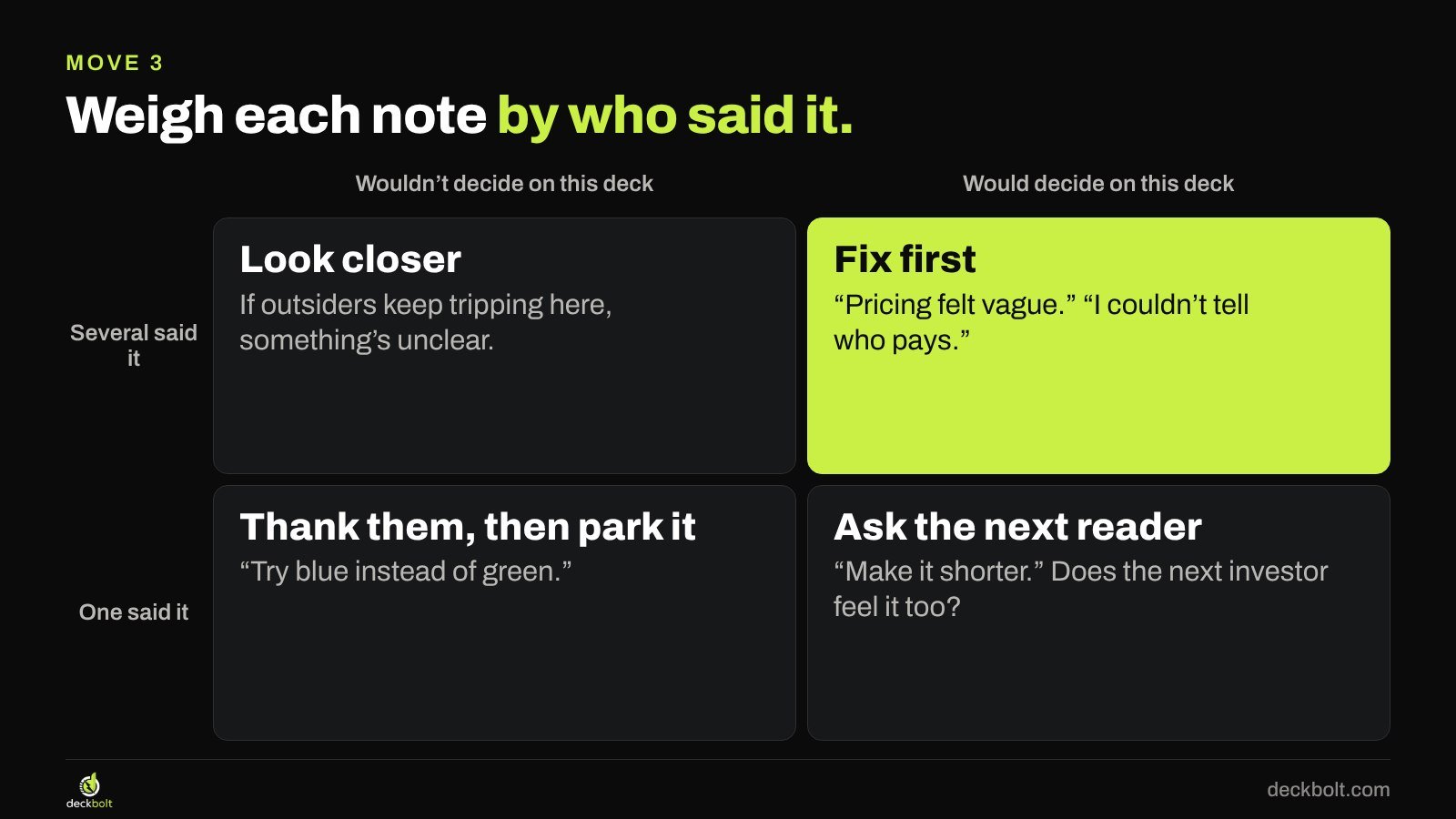
Not every reader is your audience. So ask a blunt question about each person: would they actually decide on this deck? An investor who writes seed checks reads it differently from a friend who has never seen a pitch. Cross that with how many people said it, and you get four outcomes:
- Several people, and they’d decide: fix it first.
- Several people, but they wouldn’t decide: look closer. If outsiders keep tripping on the same spot, something probably is unclear.
- One person who’d decide: ask the next reader whether they feel it too.
- One person who wouldn’t: thank them and park it.
A note from the wrong reader can still be right. It just needs a second voice before it changes the deck.
Move 4: Fix the cause, then test it on someone new
When you follow a note literally, you usually add something. “More pricing detail” becomes a five-row table with plans, order limits, add-ons and a setup fee. It looks like a response to feedback, and it’s harder to read than what it replaced.
Go back to the cause. Nobody could tell who pays and how much. One line fixes that: “Florists pay $79 a month per shop.” The full plan table moves to the appendix, where anyone who wants it can still find it.

Then test the change properly. Someone who has already read the deck can’t tell you whether it got clearer, because they already know what you meant. Give it to a fresh reader and ask three questions:
- What does this company do?
- Who pays, and how much?
- Why should I believe it?
If they can answer all three, the change worked. If they can’t, you’ve learned more from a short conversation than from another round of edits. Change a few things at a time, so you can tell what made the difference, and keep a short log of what changed and whose note it answered.
Before and after: same ten notes, two different decks
Follow every note and you get ten edits: a bigger logo, a new blue palette, extra charts, a competitor matrix and a pricing table. The deck grows from 12 slides to 19, and pricing is still unclear.
Sort first and six of the ten notes turn into three changes: rewrite the pricing slide, show paying florists instead of signups, and trim the middle. The other four are parked with thanks. The deck ends at 11 slides, and the slide that stopped three readers now answers their question.
Nothing was ignored. Every note was read, and each one got a decision.
Common mistakes when handling deck feedback
- Editing after every conversation. Unless a note is a factual error, wait until you have a batch of readers. One conversation can’t show you a pattern.
- Only asking people who like you. Friends tend to be kind, and kind readers don’t tell you where they stopped believing it.
- Arguing with the reader. You won’t be there when the deck gets forwarded, so explaining what you meant fixes nothing. Say thank you and write down where they got stuck.
- Treating doubt as a design problem. A better-looking slide won’t make a weak claim stronger.
- Fixing a number in one place. A change on one slide can quietly break another, so cross-check the numbers after each round.
Collecting notes in PowerPoint and Google Slides
It helps to ask readers to comment on the slide itself rather than in a separate email, because then every note arrives with its location attached.
- PowerPoint: share the file and ask readers to use Review → New Comment. Keep the file on OneDrive or SharePoint so File → Info → Version History can take you back to an earlier round.
- Google Slides: share with comment access and ask readers to use Insert → Comment. File → Version history → Name current version marks the deck before each round of edits.
A short checklist before you edit
- Did you note where they stumbled, not just what they suggested?
- Did more than one reader stop at the same place?
- Would this person actually decide on this deck?
- Are you fixing the cause, or just doing what the note said?
- Has someone new read it since the change?
The company, readers, notes and numbers in this article are illustrative.
If you’re staring at a pile of notes and can’t tell which ones matter, a fresh and experienced read can help. Request a free deck review and we’ll tell you where readers are likely to slow down, and what to fix first.