
Need a budget or roadmap deck designed? See our corporate presentation design service.
A budget request rarely fails because the idea is bad. It fails because the idea sits next to four other good ideas, and there is only money for two of them.
That is the part many request decks leave out. They explain the project in careful detail, build up to the number near the end, and treat approval as a verdict on one idea. The people holding the budget see something else: a list of requests that adds up to more than they can fund.
This guide is for managers, department heads and founders who need to ask leadership or finance for money. It covers why requests stall, the order decision-makers tend to read them in, and five moves that make yours easier to approve. One worked example runs through the whole guide, and there is a short checklist at the end.
Why good requests stall
Think about what the decision looks like from the other side of the table. Someone in finance or on the leadership team has a fixed amount left for the quarter. Five requests arrive. Each one is sensible. Together they add up to more than twice what is available.
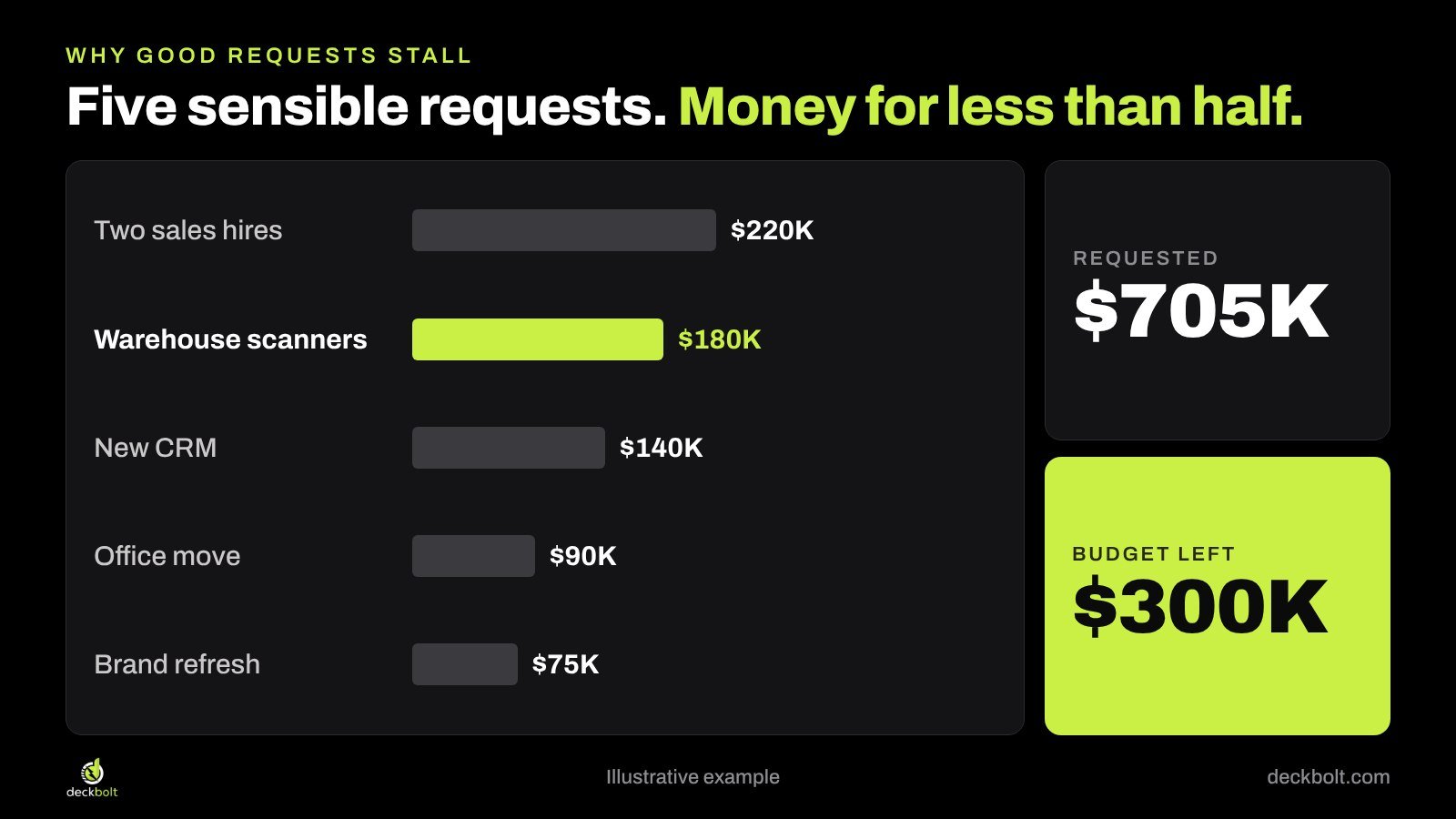
In that position, the reader isn’t really asking “Is this a good idea?” They are asking “Is this a better use of the money than the other things I could do with it?” That is a comparison, and a comparison needs numbers that can be lined up side by side.
Stalled requests tend to share the same three problems:
- The ask comes late. Background, current state, vendor overview, features, timeline, and only then the investment. By slide 17, the reader has gone through the whole deck without knowing what is being decided.
- The cost of doing nothing is missing. The deck shows what the project costs but not what the current situation costs, so the project looks like spending and the status quo looks free.
- There is only one option. A single proposal can only be approved or refused. If anything about it feels too big, too risky or too early, the easy answer is “come back next quarter.”
All three are problems of structure, and all three can be fixed by changing what goes where.
Build the deck around four questions
Budget decisions usually come down to four questions, often in this order:
- How much, and for what?
- What happens if we say no?
- When does it pay back?
- What happens if it goes wrong?
Your first few slides should answer these, in this order. Everything else, including vendor details, feature lists and project plans, can sit behind them or in an appendix. The same principle applies to executive decks in general, as we explain in Your Recommendation Is on Slide 14. Move It to Slide 1.
The rest of this guide uses one example: the operations team at an online retailer that ships from four warehouses. Wrong orders are costing the company money, and the team wants handheld scanners in all four sites for $180K.
Move 1: Put the ask in the first line
Project names belong in project trackers. “Warehouse Modernization Initiative” tells the reader what the work is called, not what they are being asked to decide.
Write the first line as a sentence with three parts:
We need [amount] by [date] to [result].
For our example: “We need $45K by January to test scanners in one warehouse.” Why $45K rather than $180K becomes clear in Move 5.
This can feel abrupt the first time you write it. It isn’t. A reader who knows the decision from the first line can judge every slide that follows against it. A reader who doesn’t has to keep guessing why you are showing them each one.
It also helps your sponsor, who may have to repeat the request in a meeting you are not in. If your opening slide does this job well, it becomes the summary they forward. For more on that one slide, see The Executive Summary Slide.
Move 2: Show what saying no costs
Every request competes with one option that never gets a slide: doing nothing. It looks free, so it has a built-in advantage. Your job is to put a number on it.
Keep the math simple enough to check on a phone:
- 2,000 wrong orders a month
- $20 to fix each one, counting reshipping, returns and support time
- 12 months a year
That comes to $480K a year.

Now the scanners are no longer a $180K cost sitting against nothing. They are a one-off $180K set against a bill of $480K that arrives every year.
Two practical points. First, use numbers the finance team already trusts, and where you can, use their figures rather than your own. Second, show them the math before the meeting. Nobody enjoys meeting a new number in front of colleagues, and a finance partner who has already checked your calculation is a useful person to have in the room.
Be careful not to overstate it. The $480K is the total cost of the problem, not the amount the project will save. In our example the team expects to cut wrong orders by half, so the expected saving is $240K a year, or $20K a month. The deck should say that plainly.
Move 3: Give three options, not yes or no
One proposal forces a yes or a no. Three options turn the conversation into how much to do, which is a far better conversation to be in.
A simple structure for our example:
- Do nothing. $0 now, and the $480K a year in fixes continues.
- Stage it (recommended). $45K now for a pilot, then $135K more if the pilot works. Saves $20K a month at full rollout. The most the company can lose is $45K.
- Do it all now. $180K now. Saves the same $20K a month, sooner, but the full amount is spent before anything has been tested.
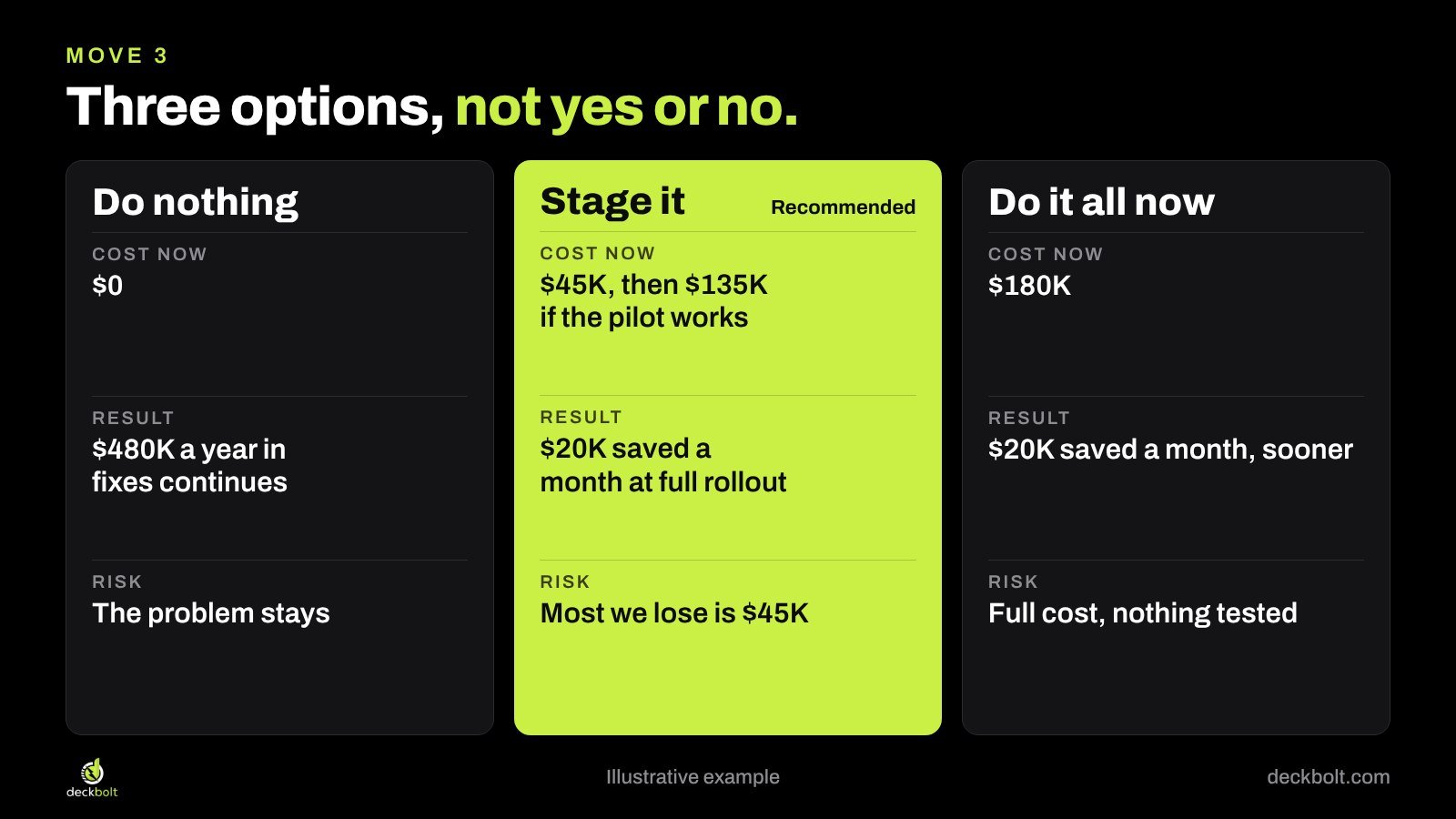
Mark your recommendation and say why. Options without a recommendation look as if you have handed the decision back. And keep the options real. If two of them exist only to make the third look good, an experienced reader will notice straight away.
Use the same rows for every option: cost now, result, risk. That is what makes them comparable. In PowerPoint or Google Slides, build this as a real table or as three aligned shapes rather than text boxes placed by eye, so the rows line up across the slide.
Move 4: Show the payback, and the slower case
Payback is the point where the money saved catches up with the money spent. For the full rollout, that is $180K spent and $20K saved a month, so it pays back in month 9. That assumes wrong orders halve.
Now show what happens if they don’t. If wrong orders fall by only a quarter, the saving is $10K a month and payback moves to month 18.
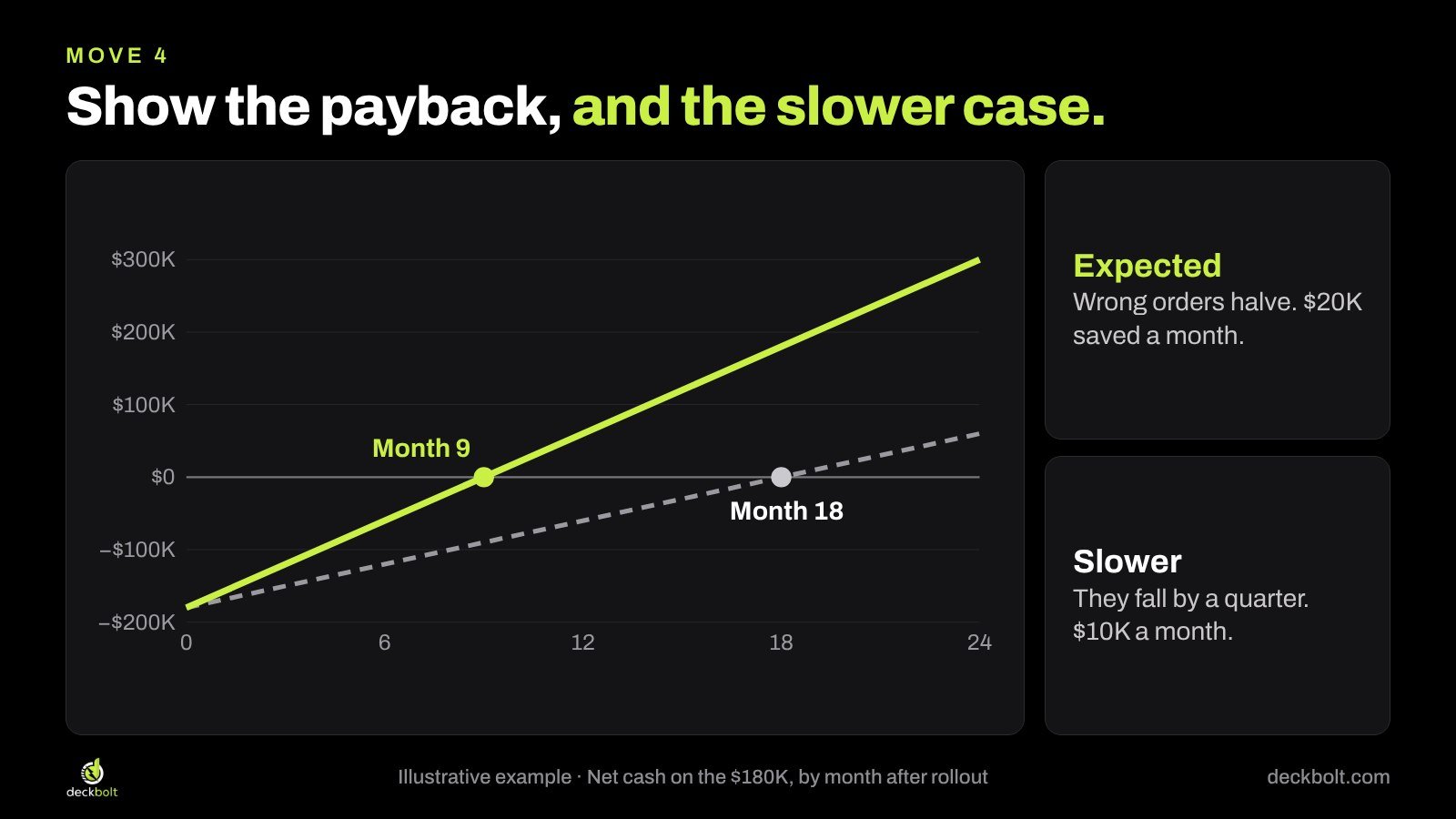
Showing the slower case yourself does two things. It answers the question the reader is about to ask, and it shows you have thought about being wrong. If the request still makes sense at the slower rate, it is a stronger request. If it doesn’t, you want to find that out before the meeting.
A simple line chart works well here. In PowerPoint, use Insert → Chart → Line, with one series for each case. In Google Slides, build the chart in Google Sheets and bring it in with Insert → Chart → From Sheets. Keep the expected line in your accent color, make the slower line gray and dashed, and label each line directly instead of using a legend. Mark the two points where the lines cross zero. That is the message of the chart, so it should be the first thing anyone sees.
Move 5: Ask in stages
A big yes is hard to give because it has to be right the first time. A small yes with a clear test is easier for everyone.
In our example, the team asks for $45K to run a pilot in one warehouse from January. At the end of March there is a test everyone agreed to in advance: are wrong orders in that warehouse down 30% or more? If yes, the remaining $135K is released for the other three sites. If no, the project stops and the loss ends at $45K.
Three things make a stage like this work:
- The test is a number, not a feeling. “Promising early results” can’t be checked.
- It is agreed before any money is spent. Otherwise the goalposts move.
- It has an owner. One named person reports the result on a named date.
This is also your honest answer to “What if it goes wrong?” If you are raising money from investors rather than an internal budget, the same logic applies. We cover it in Your Use-of-Funds Pie Chart Answers the Wrong Question, which ties spending to milestones.
Before and after: the same request
Here is the opening slide of our example, before and after.

The “before” has the project name and four bullets: improve accuracy, leverage new technology, enhance the customer experience, and a pointer to slide 17. All of it is true, and none of it helps anyone decide.
The “after” puts the decision in the title, then gives three short blocks: what happens if we say no, the plan, and what we need today. A leader skimming this on a phone between meetings could approve it, question it or pass it on.
Nothing useful has been lost. The vendor overview, feature list and project timeline have moved to an appendix, ready if someone asks.
Common mistakes
- Hiding the total. Showing only the first stage, when the reader will learn about the rest later, damages trust. Give both numbers up front.
- Percentages without a base. “40% fewer errors” invites “40% of how many?” Show the count as well.
- Counting time saved as cash. Hours saved only become money if the budget actually changes. If they don’t, label them as capacity, not savings.
- Surprising finance in the room. If the numbers are new to them, the meeting becomes a review of your numbers instead of a decision.
- Too much background. Your readers know the business. One line of context is usually enough. If the request is going to a board, our guide to board presentations covers how much reporting to include.
A short checklist
Before you send the deck, check five things:
- Is the amount on slide 1?
- Has finance seen the math already?
- Is “do nothing” costed as an option?
- Did you show a slower case?
- Is there a smaller first yes?
Then try one last test: could the person you are presenting to repeat your ask to their boss in one sentence? If not, keep editing the first line.
The company, numbers and examples in this article are illustrative.
Need a yes from the people holding the budget? DeckBolt designs executive, board and corporate presentations in PowerPoint and Google Slides that make the decision easy to see. Request a free deck review and we’ll tell you the three slides we’d fix first.