

It is 2 PM on presentation day. The buying team has already sat through two vendors this morning, and a fourth is waiting in reception. You plug in your laptop and open with an “About us” slide. Someone across the table glances at the clock.
A shortlist presentation is a different job from a first pitch. A first pitch has to earn interest. A finalist presentation is a side-by-side comparison with a clock on it, and the people in the room are often filling in a table as you speak. This guide is for founders, sales leaders and account teams preparing a deck for that kind of meeting, whether it follows a formal RFP or a simple “we’ve narrowed it down to three.”
Why finalist decks start to sound the same
Many vendors build a shortlist deck by reopening their standard sales deck and changing the logo on the cover. That is a reasonable instinct under deadline pressure, and every other vendor on the list has the same instinct. So the buying team sees three decks in the same order: who we are, who we work with, how we work, why choose us.
Each deck is competent. None of them is memorable. Language makes it worse, because “trusted partner,” “proven process” and “end-to-end support” are safe things to say, so everyone says them. If you covered the logos, the buyers could not tell the decks apart. When decks can’t be told apart, price becomes the easiest thing left to compare, and you do not want price to be the easiest thing to compare.
The fix is not a better template. It is a change in what the deck is trying to answer.
The question has changed
By the time you reach a shortlist, “can you do this?” is mostly settled. Someone has read your proposal or checked your references, and that is why you are in the room. The buying team has moved on to three harder questions.
- Which one fits our situation? Their systems, their dates and their constraints, not your general capability.
- Who would we actually work with? Not who sells it, but who runs it after the contract is signed.
- Can I defend this choice? Your sponsor may have to explain the decision to a boss or a committee who never saw your deck.
Each of the five moves below answers one of those questions. To keep the examples concrete, imagine a grocery chain with 40 stores choosing a delivery-scheduling vendor. It wants everything live before its November peak season.
Move 1: Build the deck on their score sheet
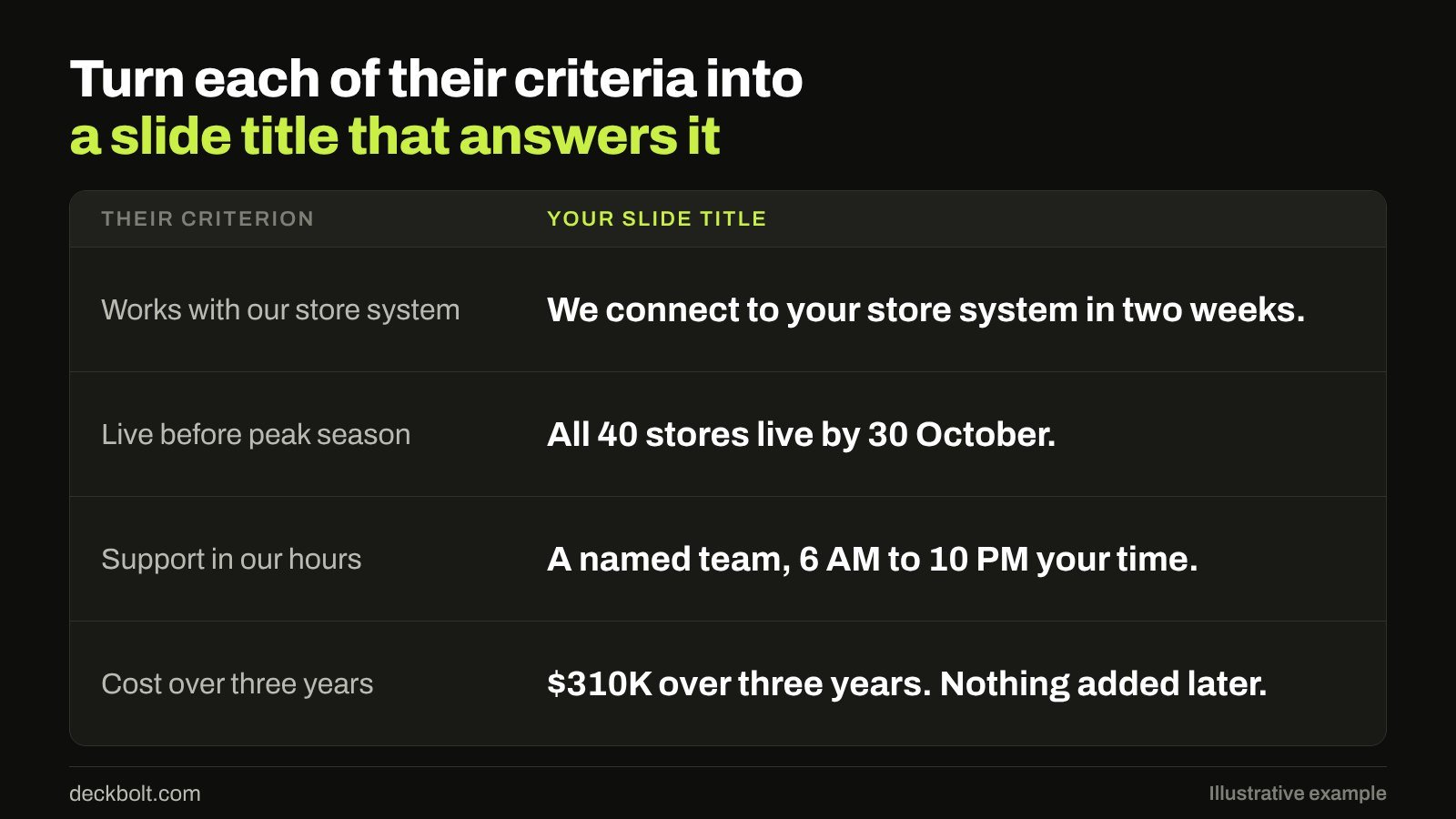
Many buying teams compare vendors against written criteria, whether that is a formal scoring template or a short list in someone’s notebook. If you have seen those criteria, build your deck around them: same headings, same order, same words. If they call it “support in our hours,” do not rename it “customer success.” You want a tired evaluator to find the place on your slide that matches the box on their sheet.
Then turn each criterion into a slide title that gives the answer. In the grocery example:
- Works with our store system becomes “We connect to your store system in two weeks.”
- Live before peak season becomes “All 40 stores live by 30 October.”
- Support in our hours becomes “A named team, 6 AM to 10 PM your time.”
- Cost over three years becomes “$310K over three years. Nothing added later.”
Read those four titles in order and you have your argument, before anyone looks at a chart.
No score sheet? Ask for it. A simple question to your contact before the meeting, “What will decide this?”, is usually welcome. Ask who will be in the room and what each of them cares about most. If you can’t get an answer, go back through your discovery notes and the wording of the brief, and write down the four or five things the buyer kept repeating.
Move 2: Pass the logo-swap test

Go through your deck line by line and cover your logo. If a rival could say the same sentence without changing a word, rewrite it. Specifics are hard to copy, and adjectives are free.
- “A trusted partner with a proven process” becomes “We’ve moved 14 grocery chains off this store system.”
- “End-to-end, customer-first support” becomes “Store managers call one person, not a queue.”
- “A flexible, scalable platform” becomes “Add a new store in a day, without your IT team.”
These lines are illustrative, and the rule behind them matters more than the wording: every claim you replace an adjective with has to be one you can prove. If the honest answer is that you have done this twice, say twice, and explain what you learned. A small true number sounds more credible than a large vague one, and a sharp evaluator will ask anyway.
Keep the “about us” material to one short slide, and place it after your proof. By then the room has a reason to care who you are. The difference between a sales deck and a pitch deck is worth rereading here, because a finalist deck is an even more specific version of the same idea: it is built for one buyer’s decision.
Move 3: Show their calendar, not your process
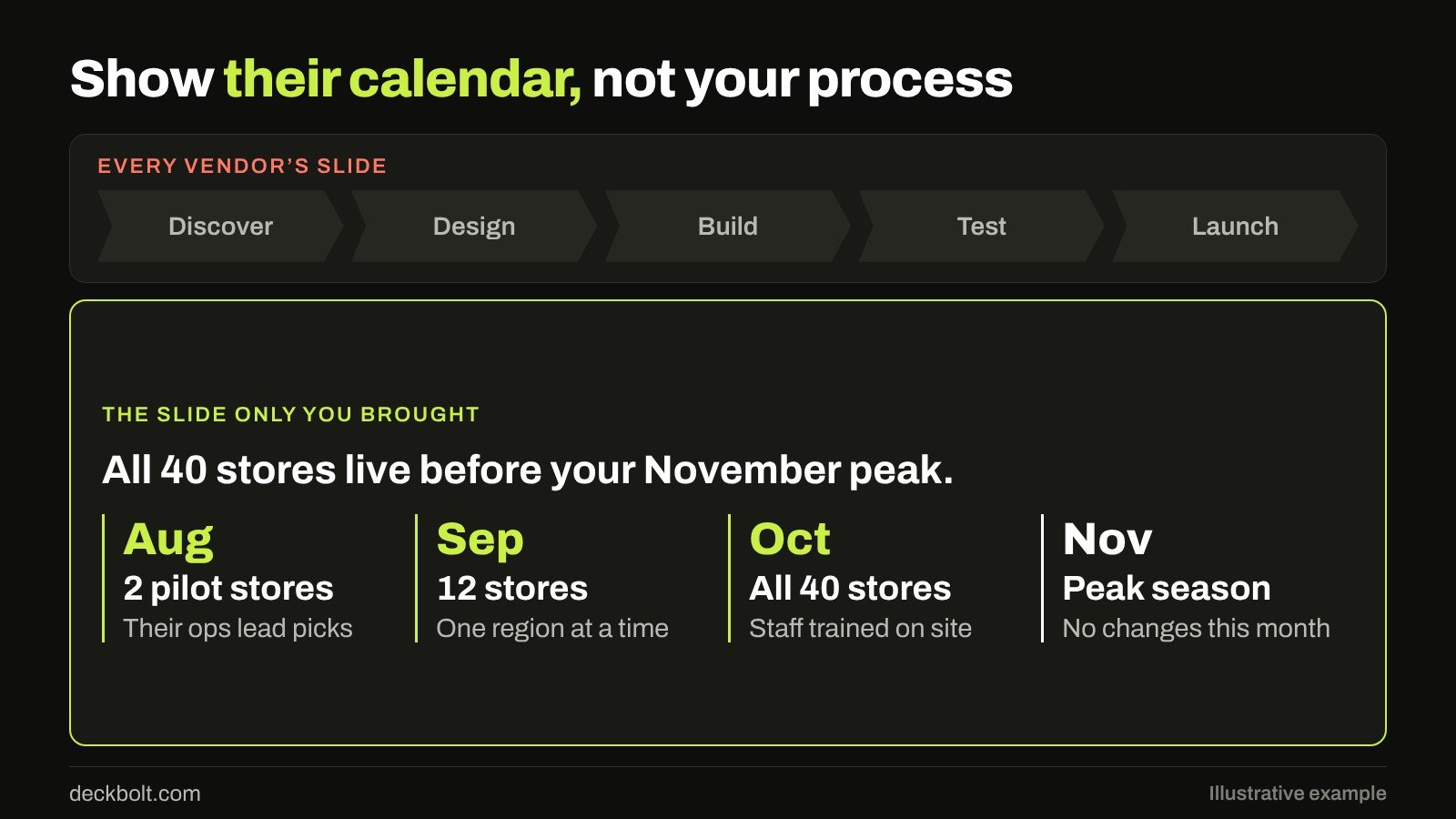
Many vendors bring the same slide: five chevrons reading Discover, Design, Build, Test, Launch. It describes how you work in general. It says nothing about this project, so the buyer learns nothing from it.
Replace it with a plan on their dates. Work backwards from the event that matters to them, in this case the November peak, and put real months on the slide:
- August: two pilot stores, picked by their operations lead.
- September: twelve stores, one region at a time.
- October: all 40 stores, with staff trained on site.
- November: peak season, with no changes this month.
This does two things your process slide cannot. It shows that you have already started thinking about their year, and it gives the buyer something concrete to test. They may tell you the pilot stores should be different ones, or that a regional manager is away in September. That disagreement is good news, because now you are planning the project together while your competitors are still presenting.
One design note: draw it as a real timeline, spaced by time, with the deadline clearly marked. The title should state the outcome: “All 40 stores live before your November peak.” If you want more on this, we’ve written about building slide layouts on a grid, which keeps a dated plan clean when the labels get long.
Move 4: Bring the people they’d work with
In many finalist meetings, the sales team does all the talking and the delivery team appears after signature. The buyer knows this, and it is one reason they ask to meet the team. If the choice is close, the people can decide it.
So give the real team real sections. In our example:
- The project lead, their daily contact, presents the rollout plan.
- The integration engineer, who connects their system, takes the technical questions.
- The account director, their escalation route, opens and closes the meeting.
Replace job titles on the team slide with a plain line about what each person will do for this client. Rehearse the handovers, because a clumsy pass between speakers looks like a clumsy project. And if the team on the slide will not be the team on the project, say so before they ask. Few things damage trust faster than the buyer discovering the swap later.
Move 5: Give your sponsor one page
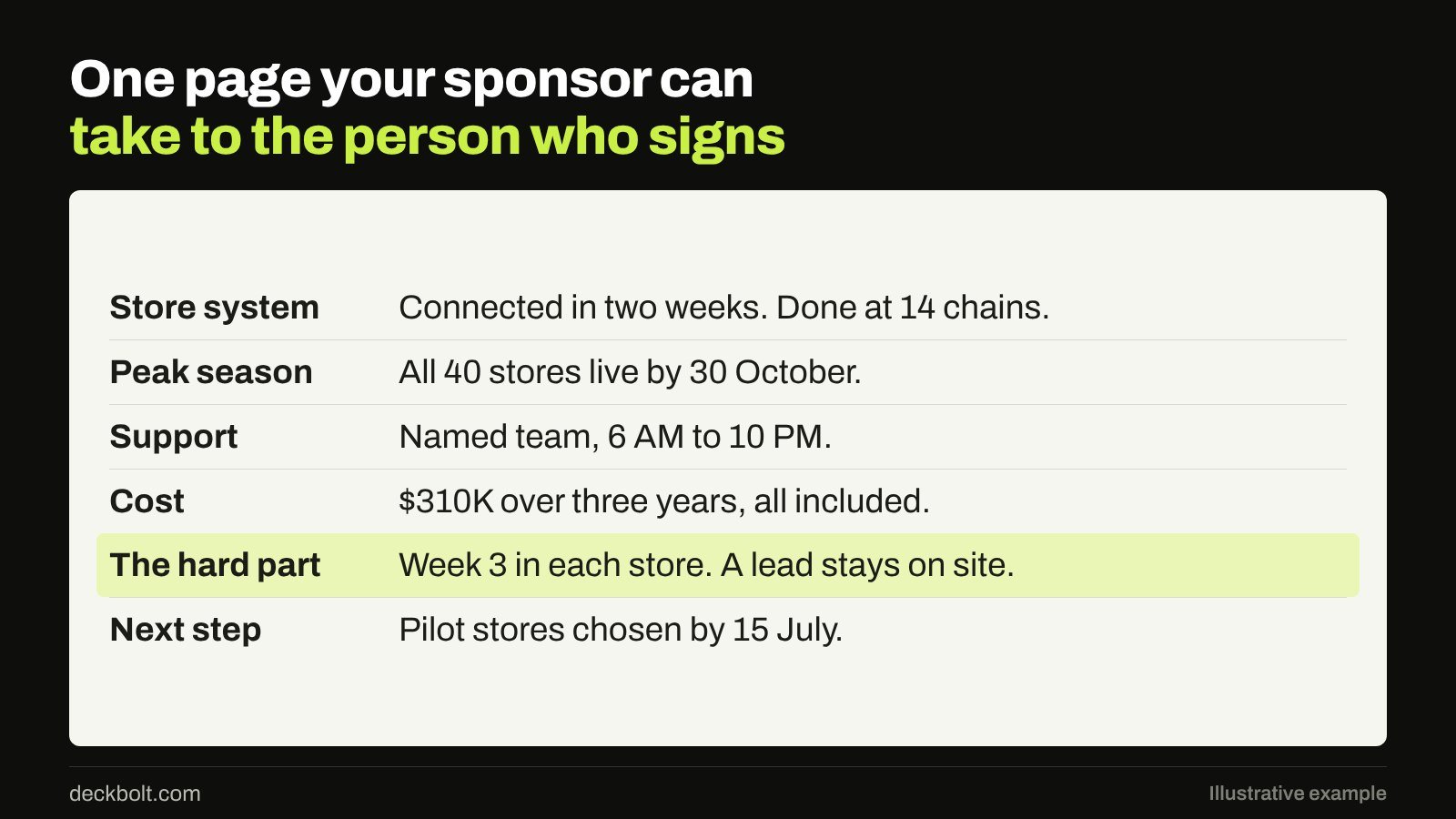
The person who signs may not be in the room. Your sponsor, the person who wants to choose you, may have to explain the decision in a few sentences to someone who has never heard of you. Your 30-slide deck will not do that job, and they will not have time to read it to anyone.
So write the page for them. Make it one page, in the same order as their criteria, written for someone who missed the meeting. For our grocery chain it would cover:
- Store system: connected in two weeks, done at 14 chains.
- Peak season: all 40 stores live by 30 October.
- Support: named team, 6 AM to 10 PM.
- Cost: $310K over three years, all included.
- The hard part: week 3 in each store, when a lead stays on site.
- Next step: pilot stores chosen by 15 July.
Notice “the hard part.” Many vendors leave it out, which is why it works. Every experienced buyer knows that rollouts get difficult somewhere. A vendor who can say exactly where, and what they do about it, sounds like one who has done this before. Our guide to decks that get forwarded without you covers the same problem from another angle: once your document leaves the room, it has to speak for itself.
Before and after: the same opening, rebuilt
Here is how the first few minutes change. The usual version opens with “About us,” then “Our clients,” then “Our 5-step process,” and reaches the buyer’s situation around slide 8. The rebuilt version opens with a single slide listing their four criteria and one line on how you meet each. Then it moves straight into the first criterion, with the project lead speaking by the second slide.
Nothing in the second version is longer or harder to produce. It simply puts the buyer’s table first. This is the same answer-first structure that works with executives, and it matters even more when your audience is on its third deck of the day.
Common mistakes to avoid
- Using all your time. Plan to finish early and leave room for questions. Questions are where buyers test you and where your team gets to show how it thinks.
- Attacking competitors. Make your difference clear, but let the buyer draw the comparison. Criticizing a rival by name rarely lands well.
- Inventing a new structure. If the brief sets an order or a time limit, follow it. Creativity belongs in the content, not in ignoring the instructions.
- Hiding the price. If they asked for total cost, show it plainly, including what isn’t covered.
- Bringing too many people. Bring the ones who will do the work and have a section to present. Silent attendees raise questions of their own.
- Leaving without a next step. Close on what happens if they choose you, with a date.
A five-question check before you walk in
- Does every section answer one of their criteria?
- Would each claim stop being true with a rival’s logo on it?
- Is the plan on their dates, not your generic steps?
- Will they meet the people they’d work with?
- Could your sponsor say “why you” in one sentence?
If you can answer yes five times, you have built a deck only you could have brought. That is the point of a finalist presentation.
The grocery chain, figures, dates and quoted lines in this article are illustrative examples, not real clients or results.
On a shortlist and short on time? We design pitch, sales and executive presentations in PowerPoint and Google Slides. Request a free deck review and we’ll show you where your deck sounds like everyone else’s, and what to fix first.